OCR Routing Architecture in Examya: How a Photo Decides the Entire Flow
Deep dive into Examya's OCR routing architecture: how a medical photo decides between quotation and lab result interpretation.
Mario Inostroza
Examya’s WhatsApp receives medical photos every single day. But how does the system decide if it’s a quote request or a lab result? The answer lies in a surprisingly simple yet robust routing architecture I learned while building this system.
The initial problem was chaotic: photos came in and got lost among multiple processing paths. Today, we have a clear system where a single decision in whatsapp-webhook.controller.ts (lines 1189-1227) drives all the logic.
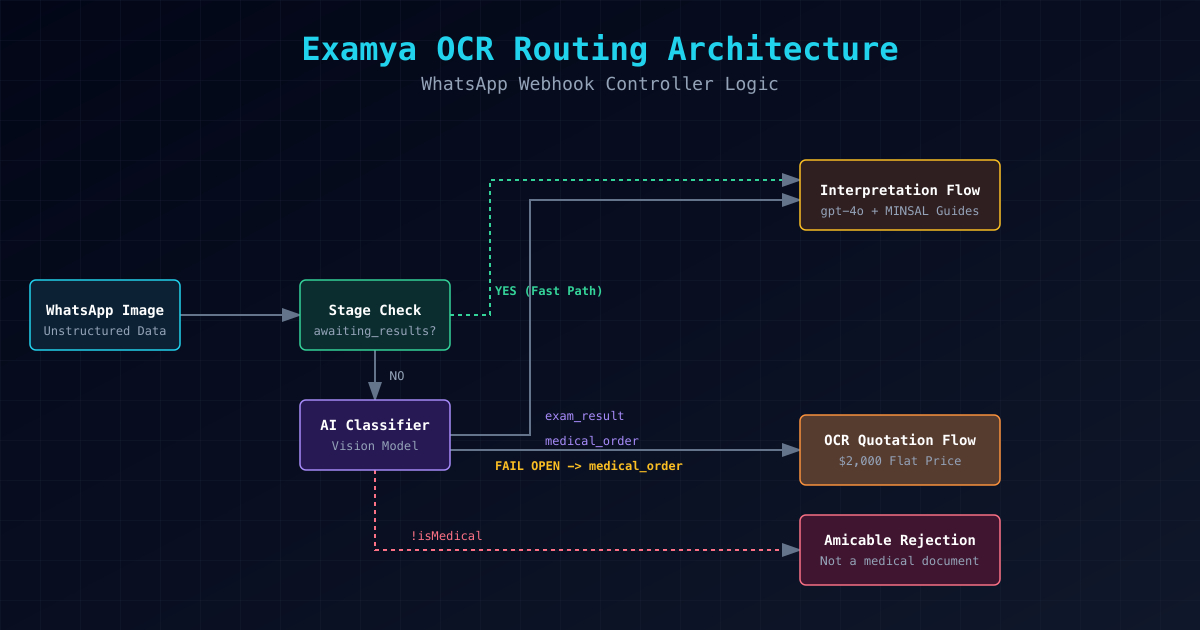
Routing Flow: Stage → Classifier → Specific Flow
1. Stage Check (Absolute Priority)
The first step is verifying if the user is waiting for results:
if (stage === 'awaiting_results_photo') {
  return handleResultsPhotoOcr(); // Jumps directly to the interpreter
}
This is powerful: if a user has already gone through the “interpret results” flow, any subsequent photo is assumed to be a result. No ambiguity.
2. Document Classifier (Core Intelligence)
If there’s no specific stage, the system uses documentClassifier.classifyDocumentFromStorage():
exam_result→ interpretation flow (unified with the previous one)medical_order→ OCR quotation flow!isMedical→ polite rejection- FAIL OPEN → assumes medical_order (never exam_result)
The golden rule: the classifier fails open as medical_order, never exam_result. This prevents false positives in interpretation.
Why is this separation critical?
Processing Cost
- Quotation: $2,000 flat CLP fee (WHATSAPP_QUOTE_PRICE)
- Interpretation: Full process using gpt-4o, MINSAL guides, and reference ranges
Legal Risk
- Quotation: Commercial document, not medical
- Interpretation: Potential diagnosis with legal implications
User Experience
- Quotation: Fast, automatic, transparent pricing
- Interpretation: Requires context, processing time, explanations
The Bug We Discovered
During construction, we detected a severe issue: state contamination in PurchaseHandler when the classifier failed. A medical photo misclassified as an order generated:
- Attempt to process as an order
- Failure in enrichment (because it was actually a result)
- Inconsistent state in pendingOcr
- Broken user experience
The solution was to completely isolate the flows: OCR Quotation and Shuri Purchase are now fully independent.
Key Code: The Central Decision
// Line 1190: stage has priority
if (stage === 'awaiting_results_photo') {
  return handleResultsPhotoOcr();
}

// Line 1195: classifier only if there is no stage
const classification = documentClassifier.classifyDocumentFromStorage();

// Golden rule: NEVER interpret without explicit stage
// If classifier fails OPEN, it goes to quotation, not interpretation
if (classification === 'exam_result' || stage === 'awaiting_results_photo') {
  return handleResultsPhotoOcr(); // Unified flow
}
What We Learned
1. Simplicity vs Complexity
Sometimes, the best architecture is the simplest. A single routing function with clear rules beats multiple complex systems.
2. Fail Open for Safety
Failing open as medical_order (not exam_result) is the right call. It’s better to generate an erroneous quote than an incorrect medical interpretation.
3. Stateful Testing
We created comprehensive tests with in-memory state: Map<string, string> to mock prismaAgents.whatsappContext. This allows us to test the entire flow without relying on the database.
4. The Importance of Stages
The stage system (awaiting_results_photo, awaiting_order_photo, etc.) isn’t just UX: it’s the foundation of correct routing. Without stages, the system would be chaotic.
What’s Next
We will soon implement:
- Improved classifier: Using embeddings for more complex medical photos
- Smart routing: Based on user history, not just the current photo
- Human fallback: When the system can’t decide, route to a human doctor
The OCR routing architecture is a perfect example of how a complex problem (ambiguous medical photos) can be solved with clear decisions and separation of concerns. Every photo that comes in has a defined destination, thanks to this simple yet powerful system.
📱 WhatsApp: +56962170366
🐦 X.com: @marioHealthBits
🌐 mariohealthbits.dev
Related reading
Similar topics
Medical OCR on WhatsApp: how my agent reads exam orders and lab results
The real architecture behind Examya's OCR pipeline: how an AI agent classifies WhatsApp photos, decides if they're medical orders or lab results, and automatically generates FONASA quotes. With real bugs and design decisions explained.
Similar topics
Examya: how I built a medical WhatsApp agent that processes exam orders
Technical details of implementing the Shuri agent in Examya, a system for processing medical orders via WhatsApp with FONASA integration.
Similar topics
The mistaken OpenAI email that forced us to migrate 45,000 embeddings
We migrated 45,678 medical vectors due to a false deprecation notice. How an OpenAI mistake improved our clinical precision by 37%.