Bidirectional Mac-VPS Sync with Engram: the brain that never sleeps
A technical tutorial on building a bidirectional sync pipeline between a Mac, a VPS in Germany, Engram, Obsidian, and the Karpathy knowledge management method. Using Python scripts, git, and cron jobs.
Mario Inostroza
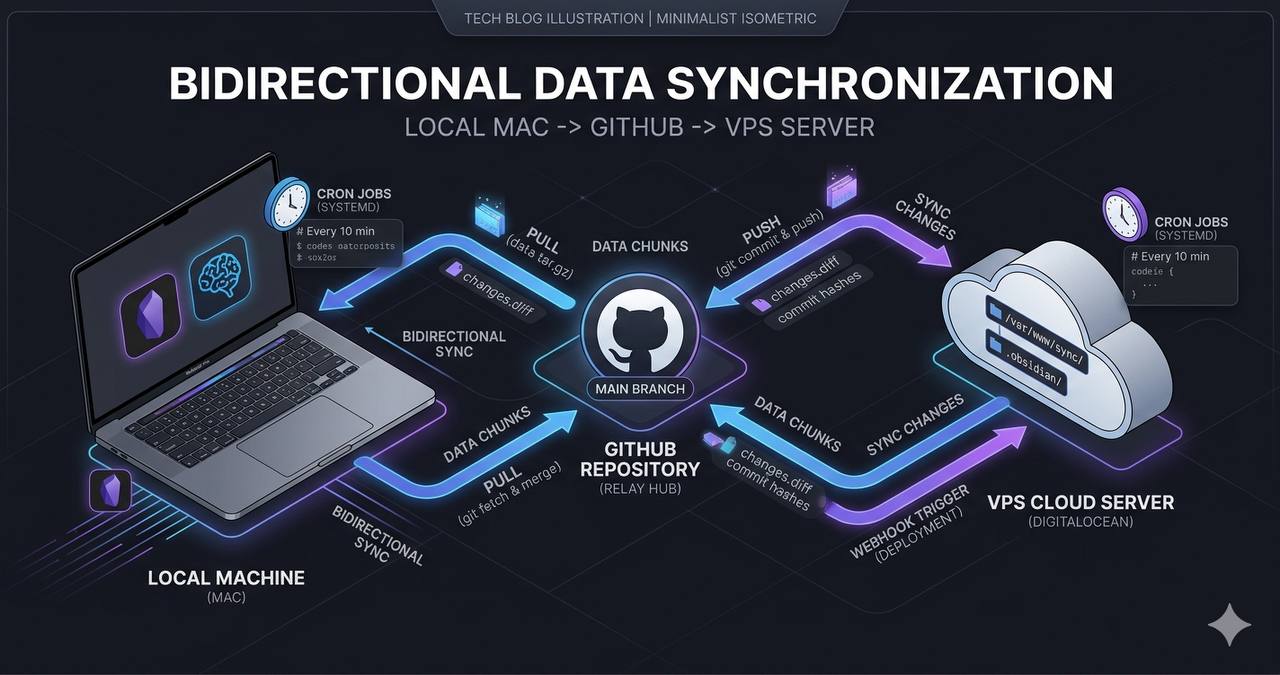
The problem is simple. I have a Mac in Puerto Natales with my Obsidian vault, a VPS in Germany running my AI agents, and I need memory to flow in both directions. No manual intervention. 24/7.
The architecture
The system has three layers communicating through compressed JSONL chunks stored in a shared git repo.
┌─────────────┐    git push     ┌──────────────┐    engram sync    ┌─────────────┐
│   Mac       │ ◄────────────── │  GitHub Repo │ ◄─────────────── │   VPS       │
│  Obsidian   │    git pull     │  (.engram/)  │    --import       │  OpenClaw   │
│  + Engram   │                 │  chunks/     │                   │  + Agents   │
└─────────────┘                 └──────────────┘                   └─────────────┘
No REST API. No central database. Just git, compressed files, and cron jobs. Simple by design.
Layer 1: VPS to Mac (export)
Every 4 hours, an OpenClaw cron job runs a Python script that:
- Scans all JSONL session files in
/root/.openclaw/agents/main/sessions/ - Extracts every
mem_savecall (the tool I use to save observations) - Filters by timestamp to avoid re-exporting what was already sent
- Deduplicates by
project:titleto avoid repetition - Generates a
.jsonl.gzfile with the new observations - Updates a
manifest.jsonwith chunk metadata - Runs
git pushto the vault repo
The core script is bridge-openclaw-engram.py, roughly 380 lines of pure Python. No external dependencies, just stdlib.
# The heart of the bridge: extract mem_save calls from session JSONL
def extract_tool_calls_from_line(line):
    d = json.loads(line)
    content = d.get("message", {}).get("content", [])
    for block in content:
        if block.get("type") == "toolCall" and block.get("name") == "mem_save":
            args = block.get("arguments", {})
            if args.get("title") and args.get("content"):
                yield args
Each chunk gets a random 4-byte hex ID (openssl rand -hex 4) and is compressed with gzip. A typical chunk weighs between 3KB and 20KB.
Layer 2: Mac to VPS (import)
Every 2 hours, another cron job does the reverse:
cd /root/obsidian-vault && git pull --rebase origin main
engram sync --import
engram sync --import reads chunks from the .engram/chunks/ directory, verifies against the local Engram database (SQLite with pgvector) to avoid duplicates, and imports new observations.
After the import, a second bridge converts Engram observations into flat .md files for QMD (the knowledge management engine):
# bridge-engram-to-qmd.py — converts observations to flat files
for obs in engram_observations:
    md_path = f"workspace/memory/{obs.project}/{slugify(obs.title)}.md"
    write_observation_as_markdown(obs, md_path)
These .md files feed the semantic search system I use from any chat session.
Layer 3: The Karpathy method
Andrej Karpathy published his “LLM-powered knowledge base” system in early 2026. The core idea: instead of searching static documents, an LLM owns the knowledge. It compiles, indexes, answers questions, and detects connections between notes.
What I did was integrate that method into the pipeline:
.mdfor conceptual notes and summaries.qmd(Quarto Markdown) for reproducible analysis with executable code- Engram as the semantic search engine over the entire vault
- OpenClaw as the orchestrator that can write, search, and compile knowledge
When I need to research a topic, the pipeline is:
qmd search "topic" → engram query "semantic query" → contextual resultsSearch is instant because everything is indexed locally in SQLite + vector embeddings.
The manifest: how everything coordinates
The .engram/manifest.json file is the shared state between Mac and VPS:
{
  "chunks": [
    {
      "id": "46694c5c",
      "file": "46694c5c.jsonl.gz",
      "created": "2026-04-09T15:37:31Z",
      "observations": 10,
      "sessions": 5,
      "source": "vps-export"
    }
  ],
  "total_chunks": 22,
  "last_export": "2026-04-09T15:37:31Z"
}
Each side checks this manifest before importing. If the chunk already exists locally, it skips. Deduplication without conflict.
Cron jobs: the two heartbeats
The sync runs on two OpenClaw cron jobs:
| Job | Schedule | What it does |
|---|---|---|
bridge-openclaw-to-engram | */4h (UTC 30) | VPS to Mac: export new observations |
engram-import-qmd-bridge | */2h (UTC 00) | Mac to VPS: pull vault, import chunks, generate .md |
Both use sessionTarget: "isolated" with glm-4.7-flash model to minimize cost. A typical bridge exports 5-15 observations in about 10 seconds.
What I learned building this
Timeouts kill bridges silently. The first bridge had a 60-second timeout on the cron job. As sessions grew, JSONL scanning started taking longer. 16 consecutive errors without anyone noticing. The fix: bump to 180s and monitor the cron’s consecutiveErrors.
Deduplication is critical. Without it, every sync re-exports everything and observations pile up. The key is the sync_id field in Engram’s database: each imported observation has a unique ID that gets verified before insertion.
Git as a message bus works surprisingly well. I didn’t need a message queue, WebSocket, or API. Git resolves conflicts with --rebase, compresses with gzip, and the repo acts as a complete audit log. If something breaks, git log has the full history.
Chunks must be small. A 20KB chunk with 10 observations is ideal. Beyond 50KB, import time grows exponentially because Engram needs to generate embeddings for each observation.
How to replicate this
The three components are in the OpenClaw repo:
bridge-openclaw-engram.pyin/root/clawd/skills/self-improve/scripts/bridge-engram-to-qmd.pyin the same directory- Engram CLI:
pip install engram(or from the Engram repo)
Prerequisites:
- A shared git repo between your machines
- Engram installed on both ends
- OpenClaw (or any cron scheduler) on the VPS
mem_save/engram savetools to generate observations
Initial setup takes about 30 minutes. After that, it’s zero-touch. The brain syncs itself.
If you’re building something with AI and need your memory to not get trapped on a single machine, this pattern might work for you. Find me on X (@marioHealthBits) or WhatsApp.