Medical OCR on WhatsApp: how my agent reads exam orders and lab results
The real architecture behind Examya's OCR pipeline: how an AI agent classifies WhatsApp photos, decides if they're medical orders or lab results, and automatically generates FONASA quotes. With real bugs and design decisions explained.
Mario Inostroza
A patient takes a photo of their medical order with their phone and sends it via WhatsApp. In less than 10 seconds, they receive a quote with FONASA prices and a payment link. No call center. No forms. No apps to install.
Here’s what happens inside.
The problem it solves
In Chile, getting the price of a lab test is frustrating. You have to call, wait, sometimes go in person. Examya solves this: the patient sends the medical order via WhatsApp and the system reads the exams, checks the FONASA catalog, and returns a quote in seconds.
The same channel handles results: when the lab has the results ready, the patient sends the photo and the agent interprets them, explains the values, and alerts if something is out of range.
The technical challenge: the agent needs to determine, in real time, whether the photo is a medical order (to quote) or a lab result (to interpret). These are completely different flows.
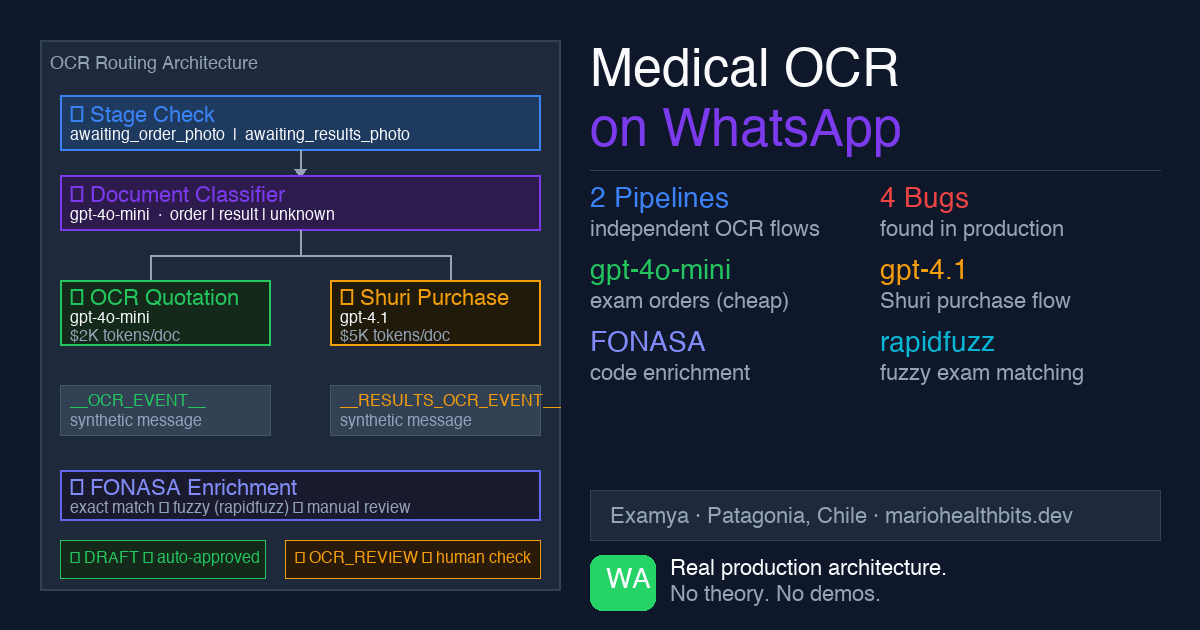
The routing architecture
Everything starts at the webhook controller. When Meta sends a WhatsApp message with media, handleMediaMessageFromBuffer() processes it before Shuri (the conversational agent) ever sees it.
The decision flow has three layers:
Photo arrives via WhatsApp
        ↓
stage == 'awaiting_results_photo'?
  YES → handleResultsPhotoOcr() → ExamResultInterpreterAgent
        ↓ (if NO)
Document Classifier
  'exam_result'   → handleResultsPhotoOcr() → ExamResultInterpreterAgent
  'medical_order' → OCR Quotation → FONASA enrichment → payment link
  not_medical     → "That doesn't look like a medical document"
Stage takes absolute priority. If the patient is in awaiting_results_photo, the photo goes straight to interpretation without hitting the classifier. The system already knows what to expect.
If there’s no active stage, the document classifier kicks in. Here’s a deliberate design decision: the classifier fails open as medical_order. If it can’t classify the image, it assumes medical order and sends it to quotation. I’d rather over-quote something that wasn’t an order than misinterpret a result.
The event bridge: how the photo reaches the agent
Shuri doesn’t detect media directly. The webhook processes the image, runs OCR, and then injects synthetic messages into the agent:
__OCR_EVENT__:for medical orders (quotation)__RESULTS_OCR_EVENT__:for results (interpretation)
The agent never sees the image. It sees a text event with the already-processed OCR result. This separation keeps Shuri channel-agnostic: the same agent could receive events from email, SMS, or any other channel without changing its internal logic.
Two pipelines, two models, two prices
The quotation and interpretation flows are completely independent.
OCR Quotation (medical order):
- Model:
gpt-4o-mini(speed and cost) - Price:
$2,000 CLPfromWHATSAPP_QUOTE_PRICEenv var - Creates
MedicalOrderSalewithisQuotation: true - PDF: title “EXAM QUOTE”, FONASA prices (National 3 levels / Magallanes level 3), no doctor section
Shuri Purchase (purchase from symptom conversation):
- Model:
gpt-4.1for the interpreter (precision) - Price:
$5,000 CLPfromWHATSAPP_ORDER_PRICEenv var - Creates
MedicalOrderSalewithisQuotation: false - PDF: title “MEDICAL ORDER”, with doctor section, no FONASA prices
The separation is intentional. A quote is informal; a medical order has legal consequences. The PDFs, prices, and flows are different by design.
FONASA enrichment
After the OCR extracts the exams from the image, the hard part begins: mapping those names to the official FONASA catalog.
The problem: doctors write names in different ways. “Hemograma”, “complete blood count”, “CBC”, “full blood panel” are all the same exam. The OCR can extract any variant.
The enrichment uses two strategies in order:
- Exact match against the catalog (with accent and capitalization normalization)
- Fuzzy match with
rapidfuzzif exact fails
Exams that don’t match either strategy go into enrichedResult.pending and the patient is notified: “I found these exams but couldn’t quote them automatically.” Nothing is silently dropped.
The bugs I found in production
Bug 1: hardcoded price. In two places in the controller there was const FIXED_ORDER_PRICE = 2000 instead of reading from the env var. PurchaseHandler read correctly from WHATSAPP_QUOTE_PRICE, but the OCR flow didn’t.
Bug 2: duplicate payment link. The controller sent the link inline synchronously, AND the Bull processor also sent it ~48 seconds later. The patient received two different links for the same order. Fix: markPaymentLinkSent(orderId) in an in-memory deduplication Map with a 5-minute TTL.
Bug 3: isQuotation contamination. If the patient had previously quoted (OCR flow, isQuotation: true) and then wanted to purchase (Shuri Purchase), the session context still had isQuotation: true. The purchase order came out as a quotation at $2,000. Fix: hardcode isQuotation: false in PurchaseHandler. The purchase flow never creates quotations.
Bug 4: silently dropped exams. When creating an order from pending OCR, exams without valid FONASA codes (/^\d{6,7}$/) were dropped silently. The patient received an order with fewer exams than they sent.
Automatic quality status
With PR #349, the pipeline now evaluates its own quality before creating the order.
OcrExtractionEvaluatorService analyzes the result and returns ocrQualityPassed: boolean. If quality is low (blurry image, few exams detected), the order enters OCR_REVIEW status and a human operator reviews it before it reaches the patient.
ocrQualityPassed === true      → DRAFT       → normal flow
ocrQualityPassed === false     → OCR_REVIEW  → human review
ocrQualityPassed === undefined → DRAFT       → safe default
This prevents the patient from receiving a quote with 0 exams because the photo was blurry.
The edge case that hurt most
Patient in awaiting_results_photo (waiting to send their lab results). By mistake, they send a photo of a new medical order.
The system, following the stage priority rule, treats it as a result. It responds: “I couldn’t identify values in your document.” The stage resets to START. The quotation is lost. The patient starts over.
Documented bug, pending fix. The right solution: if the stage says awaiting_results_photo but the classifier says medical_order with high confidence, ask the patient what they intended. For now, stage always wins.
What’s next
The exam normalizer is at 0% in the current baseline because it doesn’t canonicalize names against the catalog. When OCR returns “funcion hepatica”, the normalizer should automatically map it to “HEPATIC PROFILE” before FONASA enrichment. That’s the next fix.
The pipeline works. What comes next is making it more robust against low-quality images and less common name variants.
If you’re building medical document processing with AI and have questions about the architecture, find me on X (@marioHealthBits) or WhatsApp.