Crowdsourcing medical prices: how Examya builds cost transparency layer by layer
The real architecture behind Examya's 3-layer pricing intelligence: FONASA data, user crowdsourcing, and order generation from WhatsApp. With code, design decisions, and real bugs.
Mario Inostroza
In Chile, finding out how much a lab test costs is an exercise in patience. You call the lab, get put on hold, they give you a price that varies based on your insurance tier, your FONASA level, and whether the wind blows from the south. Multiply that by 5 tests and 3 different labs. Half your morning, gone.
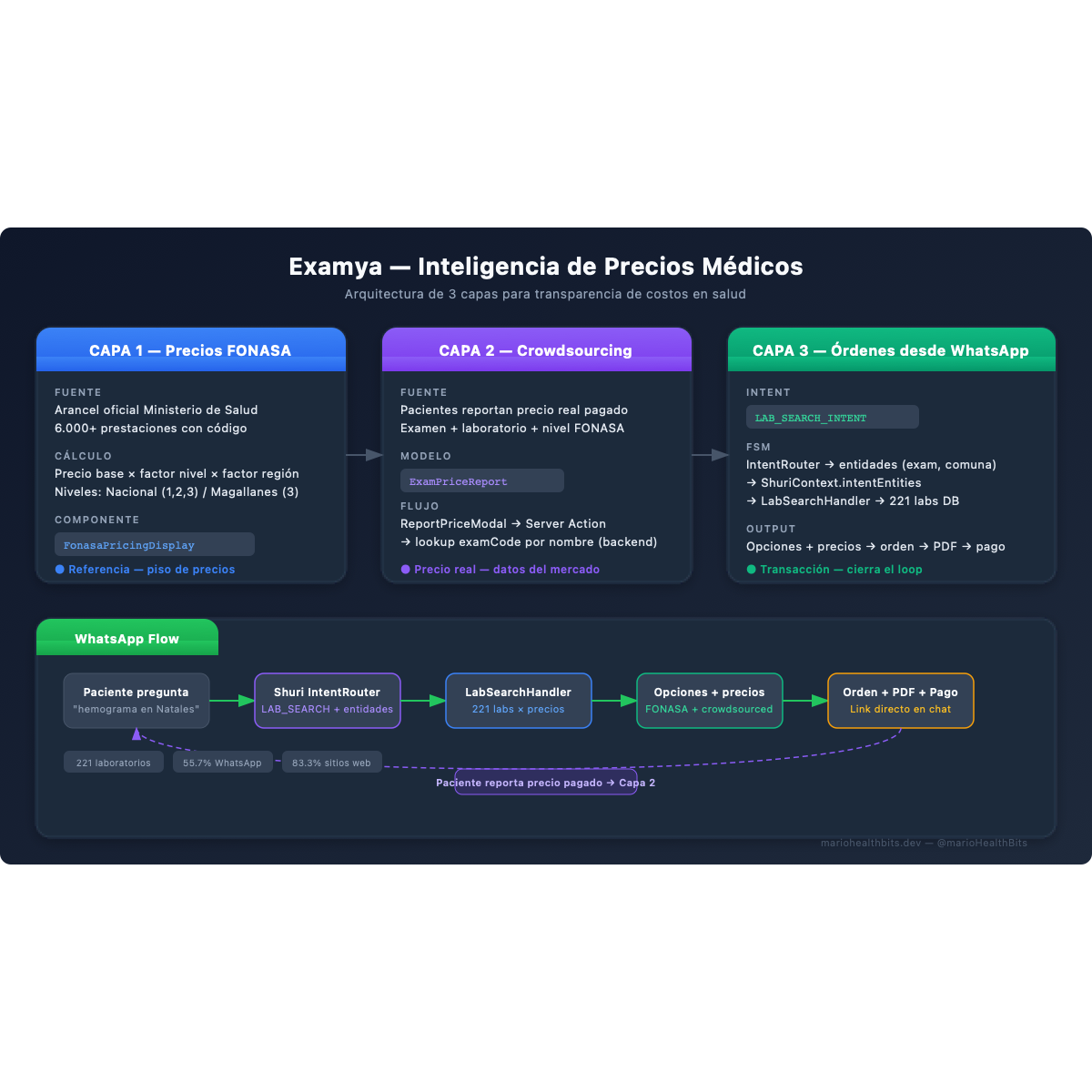
Examya solves this with a 3-layer system we’re building incrementally. Each layer adds a different data source. None replaces the previous one. They stack.
Layer 1: official FONASA pricing
The foundation is the FONASA catalog. Chile’s Ministry of Health publishes a fee schedule with over 6,000 procedures, each with a code and a base price in Chilean pesos.
The problem: that base price isn’t what you pay. It gets multiplied by a factor based on your coverage level (FONASA A, B, C, or D) and your region. A CBC in Santiago costs different than in Punta Arenas. The Magallanes schedule has a differentiated factor.
In Examya, the FonasaPricingDisplay component takes the exam code and shows three columns: level 1 price, level 2, level 3. For Magallanes, it shows only level 3 with the regional factor applied. It’s not a static table. Every price is calculated in real time against the catalog we keep synced.
This works well as a reference. But it has a clear limit: the FONASA price is the floor. Private labs charge whatever they want above it. And there’s no public record of what they actually charge.
Layer 2: crowdsourced real prices
This is where it gets interesting.
When a patient gets a test done and pays at a lab, they know exactly how much it cost. That data point, which today gets lost in a receipt or a bank transfer confirmation, has enormous value when aggregated.
Layer 2 lets any user report the real price they paid. The database model is ExamPriceReport:
ExamPriceReport
├── examCode      (FONASA exam code)
├── examName      (human-readable name)
├── labId         (lab where they paid)
├── price         (actual price in CLP)
├── fonasaLevel   (patient's coverage level)
├── reportedAt    (report date)
└── userId        (who reported)
On the frontend, the ReportPriceModal appears after the user searches for an exam and sees the FONASA reference prices. A button says: “Paid a different price? Report it.” The form is minimal: lab, price, FONASA level. Three fields.
The Server Action price-report.actions.ts receives the report and persists it. There’s a design decision here worth telling: the frontend doesn’t have access to the examCode. The pricing component shows the exam name, but the FONASA code doesn’t travel in the response DTO. Instead of adding the field to the DTO (which meant touching the API, the type, and all consumers), the Server Action looks up the code by exam name directly on the backend.
// Instead of receiving examCode from the frontend:
const exam = await db.fonasaExam.findFirst({
  where: { name: { equals: examName, mode: 'insensitive' } }
});
Pragmatic. One extra lookup that saves changes across 4 files.
With enough reports, each exam at each lab has a range of real prices. The patient no longer sees just “FONASA says X.” They see “patients like you paid between X and Y at this lab last month.”
Layer 3: from search to medical order in a single conversation
The first two layers are informational. Layer 3 closes the loop: the patient can buy a medical order directly from WhatsApp, after searching prices or interpreting results.
The Shuri agent (which lives on WhatsApp) already knew how to interpret lab results and quote medical orders from photos. What was missing was a search intent: “Where can I get a CBC near my house?”
For this we added LAB_SEARCH_INTENT to Shuri’s intent router. The LLM analyzes the patient’s message and, if it detects a search intent, extracts two entities: the exam and the location.
The gotcha was in the state machine. Shuri uses an FSM (ShuriStateMachine) that maintains context between messages. When the IntentRouter detects an intent, it returns an IntentDecision with the extracted entities. But the FSM context (ShuriContext) had no field for those entities. The search handler couldn’t know what exam or location the patient had asked about.
// Before: entities were lost in the transition
stateMachine.transition('LAB_SEARCH');
// handler: "what exam do I search for? No idea"

// After: entities travel in the context
shuriContext.intentEntities = intentDecision.entities;
stateMachine.transition('LAB_SEARCH');
// handler: { exam: "CBC", location: "Puerto Natales" }
The LabSearchHandler receives the entities, queries the database of 221 consolidated labs (that’s another story), filters by location, and returns options with prices. If the patient wants, it generates the order right there.
The full flow:
Patient: "Where can I get a CBC in Puerto Natales?"
    ↓
IntentRouter → LAB_SEARCH_INTENT
    entities: { exam: "CBC", location: "Puerto Natales" }
    ↓
LabSearchHandler → query DB → 3 labs found
    ↓
Shuri: "I found 3 options:
  1. Lab Sur - $4,500 CLP
  2. Lab Austral - $5,200 CLP
  3. Clínica Natales - $4,800 CLP
  Want me to generate an order?"
    ↓
Patient: "Yes, at Lab Sur"
    ↓
Order generation → PDF → payment link → WhatsApp
The same logic works after interpreting results. If the agent explains “your cholesterol is high, you should repeat the lipid panel in 3 months,” the call-to-action at the end of the InterpretResultsHandler offers to search nearby labs for the follow-up. The patient never leaves the conversation.
The 3-layer system as a competitive advantage
None of these layers is revolutionary on its own. FONASA prices are public. Crowdsourcing exists in other industries. Order generation is a standard transactional flow.
What’s hard to copy is the combination. Each layer feeds into the next: FONASA prices provide the reference. User reports provide the real market price. Lab search uses both to show informed options. Order generation monetizes the full flow.
And it all happens on WhatsApp. No apps to install. No accounts to create. The patient talks to a contact and resolves in minutes what used to take half a day.
What’s next
Layer 2 is still cold. We have the infrastructure but few reports. The challenge now is product, not code: how to motivate the patient to report their price after paying. We’re evaluating a simple incentive: access to detailed comparative pricing in exchange for a report.
The base of 221 labs has 55.7% WhatsApp coverage and 83.3% website coverage. Every new lab that joins improves Layer 3 options. It’s a slow but consistent network effect.
The next technical step is connecting price reports to the LabSearchHandler so search results show real reported prices alongside FONASA reference prices. When that’s done, the loop closes: the patient searches, compares with real data, buys, and then reports their price for the next person.
If you’re building health products with AI and want to discuss pricing data architecture, find me on X (@marioHealthBits) or on WhatsApp.
Related reading
In this series
How I Built Patagonia's First Private COVID PCR Lab (And Why I Ended Up Building AI)
In March 2021, I hoisted 300 kg of biosafety cabinet by crane to a second floor during lockdown. By May we were running the first private COVID PCR tests in Chilean Patagonia. The nights that followed became the real origin of Examya.
In this series
Examya: how I built a medical WhatsApp agent that processes exam orders
Technical details of implementing the Shuri agent in Examya, a system for processing medical orders via WhatsApp with FONASA integration.
In this series
pgvector + Embeddings in Production: The Foundation of Medical Reasoning in Examya
Architecture for semantic search and text similarity in production with pgvector, pg_trgm, and real MINSAL data.