My Digital Brain: How I Connected Memory, Knowledge, and Automatic Publishing
How I built a system that extracts AI memories from a VPS, organizes them in Obsidian Karpathy-style, and publishes articles automatically to a blog, X.com, and LinkedIn.
Mario Inostroza
Six months ago, every time I finished a work session with Claude, the accumulated knowledge vanished. Architecture decisions, bugs fixed at 2am, patterns discovered while debugging a third-party API — all lost in a void of ephemeral contexts. Today, I have a system that remembers for me, organizes that knowledge automatically, and when I decide to share it, publishes across three platforms without me touching a button.
I call it my digital brain.
The problem: two brains that weren’t talking to each other
I work on two simultaneous fronts. On my Mac, design and writing sessions with Claude Cowork. On my VPS (srv788271), an agent called Cotocha (OpenClaw) handles technical tasks: code, deployments, overnight Examya debugging.
Each accumulated knowledge in separate silos. Cotocha knew about server configuration errors. My Mac knew about product decisions. Neither knew about the other’s work. The result was a partially amnesic memory system.
The second problem was publishing. I had ideas, I had context, but the path from “I thought of something interesting” to “it’s published on the blog and tweeted” involved too many manual steps.
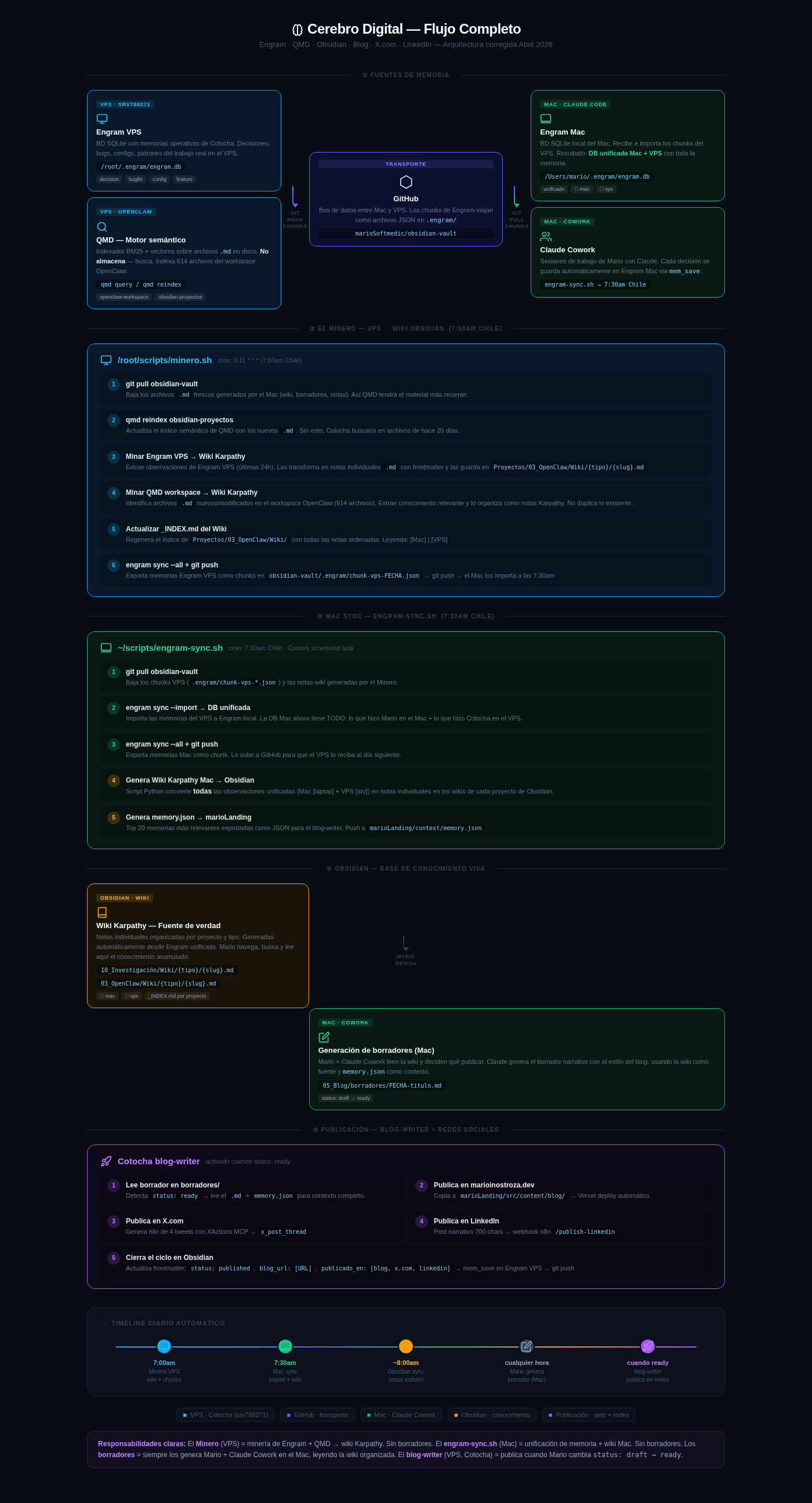
The architecture: four layers feeding each other
After weeks of iteration, I arrived at a four-layer system.
Layer 1: Memory sources
Engram is the central piece. It’s a SQLite database that stores structured observations: every important decision, every resolved bug, every identified pattern gets recorded with metadata (type, project, topic_key, source). I run one instance on the VPS (/root/.engram/engram.db) and another on my Mac (/Users/mario/.engram/engram.db).
QMD (OpenClaw) complements Engram from the opposite angle. It doesn’t store — it indexes. It’s a BM25 + vector semantic engine that indexes the 614 .md files in the OpenClaw workspace. When Cotocha needs context on a topic, qmd query "pattern X" returns the most relevant fragments from the entire knowledge base.
Layer 2: The Miner — overnight automation on the VPS
Every morning at 7:00am (Chile time), a cron runs /root/scripts/minero.sh. This script does something simple but powerful:
- Pulls the latest files from the Obsidian vault via GitHub
- Reindexes QMD with the new material
- Extracts Engram VPS observations from the last 24 hours
- Transforms each observation into an individual
.mdnote with frontmatter — the format Andrej Karpathy describes for a personal wiki - Identifies new files in the OpenClaw workspace and extracts relevant knowledge
- Pushes everything to GitHub: the wiki notes and exported memory chunks
The result: Cotocha “remembers” what it did yesterday, and that knowledge automatically becomes navigable structure.
Layer 3: Mac synchronization — unified database
At 7:30am, engram-sync.sh on the Mac picks up what the Miner left behind:
- Imports Engram VPS chunks to the Mac database → Unified Mac + VPS DB
- Generates the local Karpathy wiki: converts all observations (Mac + VPS) into individual notes in the Obsidian vault
- Exports
memory.json: the top 20 most relevant memories as context for the blog-writer
By 8:00am, the Obsidian vault has up-to-date knowledge from both systems. GitHub acts as the data bus — Engram chunks travel as JSON files in .engram/ within the marioSoftmedic/obsidian-vault repository.
Layer 4: Publishing — from draft to three platforms
When I want to publish something, Mario + Claude Cowork read the wiki and generate a narrative draft in 05_Blog/borradores/. The draft lives in Obsidian with status: draft.
When I change the frontmatter to status: ready, Cotocha detects the change and runs the blog-writer skill:
- Reads the complete draft plus
memory.jsonfor context - Copies the article to
marioLanding/src/content/blog/→ automatic Vercel deploy - Generates a 4-tweet thread with XActions MCP (
x_post_thread) — no API keys, uses browser auth token - Publishes a 700-char narrative post on LinkedIn via n8n webhook (
/publish-linkedin) with native OAuth2 - Closes the loop: updates frontmatter with
status: published,blog_url,publicado_en: [blog, x.com, linkedin]and runsmem_saveon Engram VPS
The tools that make it possible
The full stack consists of open source or low-cost tools:
- Engram (mem_save MCP): persistent memory with MCP protocol
- QMD: BM25+vector semantic engine running on the VPS
- Obsidian: local vault synced with GitHub, Karpathy-style wiki format
- XActions MCP (nirholas/XActions): 140+ X.com tools without API keys
- n8n: automation with native LinkedIn OAuth2 node
- Vercel: automatic blog deploy on every push
- GitHub: bidirectional data bus Mac ↔ VPS
What changed in my workflow
The most important change isn’t technical — it’s cognitive. Before Engram, I’d make architecture decisions and the next day doubt why I’d made them. Now, every decision has a trail. I can ask Cotocha “what did we decide about Examya’s database schema?” and receive the exact observation, with date, project, and reasoning.
The second change is composure when publishing. The process of writing an article no longer starts from scratch — it starts from the wiki. I read the patterns that emerged over the last few weeks, identify what’s worth sharing, and the draft is generated on real knowledge, not vague memories.
What’s next
There are three pieces I’m still fine-tuning:
LinkedIn OAuth2: The marioinostroza-publisher app is in configuration. I need to complete the OAuth flow in n8n with Cotocha’s ngrok URL. Once ready, the publishing pipeline is complete.
Deeper QMD semantic mining: Currently the Miner extracts by date. The next step is using QMD to identify patterns between observations — emergent knowledge that isn’t in any individual note but can be inferred from the set.
Public wiki: A curated selection of Karpathy notes published on the blog as a reference resource. The personal version of Karpathy’s “100 pages of ML,” but about agent systems.
If you’re building something similar or have questions about any piece of the stack, reach out. This system was born from many failed attempts, and the corrections came from real conversations.
Related reading
In this series
Cotocha: the agent orchestrator that runs my life from a VPS
How I built an AI agent system that handles infrastructure, alerts, databases, and blogging from a server in Germany. No middlemen, no fancy dashboards.
In this series
One Week of Building: 82 Decisions That Shaped an AI Product
What Engram's memories reveal about a real week of development: bugs caught, architecture hardened, and the invisible decisions that make a medical agent work.
In this series
Bidirectional Mac-VPS Sync with Engram: the brain that never sleeps
A technical tutorial on building a bidirectional sync pipeline between a Mac, a VPS in Germany, Engram, Obsidian, and the Karpathy knowledge management method. Using Python scripts, git, and cron jobs.